Omnivore List Popup: Convenient Access to Your Omnivore Articles
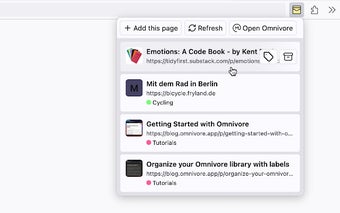
Omnivore List Popup is a free Chrome extension developed by HerrHerrmann. This unofficial extension is designed for Omnivore users who want quick and easy access to their Omnivore articles. Inspired by the popular "In My Pocket" extension for Pocket, Omnivore List Popup allows users to view a popup with a list of their Omnivore articles, making it convenient to open or archive them.
With Omnivore List Popup, you can easily see all your Omnivore articles in a popup window. Simply click on an article to open the original URL in a new tab. To keep the popup open while opening an article, just press and hold CMD (CTRL on Windows/Linux) while clicking. Archiving articles is also made quick and easy with the archive button.
In addition to these features, Omnivore List Popup allows you to change the labels of an article and provides a direct link to the Omnivore main website. The extension is constantly being improved, with more features on the horizon.
To get started with Omnivore List Popup, you'll need to obtain an Omnivore API Key through your Omnivore Account. Once you have your API key, simply install the extension from the Chrome Web Store. Paste your API key into the extension's settings, and then launch the extension by clicking the "Omnivore List Popup" button in your Chrome extension toolbar or dropdown. You also have the option to add the extension to your always-visible toolbar for easy access.
For those interested in the technical details, the source code for Omnivore List Popup is available on GitHub, along with a dedicated issue tracker for reporting any problems or suggesting improvements.
Overall, Omnivore List Popup is a handy tool for Omnivore users who want a convenient way to access and manage their Omnivore articles directly from Chrome. Give it a try and streamline your article reading experience today!